빌딩
빌딩
 SOHO 매장
 기업
기업
 공항
공항
 은행
은행
 카지노
카지노
 산업 단지
산업 단지
 캠퍼스
캠퍼스
 쇼핑몰
쇼핑몰
 고속도로
고속도로
 의료
의료
 항구
항구
 온도 선별검사
 스마트 침입 탐지
 뉴스
뉴스
 쇼룸
쇼룸
 성공 사례
성공 사례
 구독자
구독자
 브로셔
브로셔
 사용자 설명서
 펌웨어
펌웨어
 소프트웨어
소프트웨어
 회사
회사
 파트너
파트너
 연락처
연락처
 온라인 문의





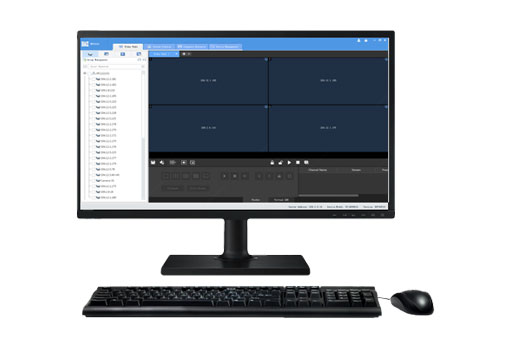
| Model | SWP-EZWall |
| BOM | |
| BOM | 0501C1KH |
| Function | |
| Device Management | Add, edit, and delete devices on LANSupports automatic search, and allows user to add devices manuallyOpen device's Web interface from the clientView device status, including status of NVR-connected IPCsSupports Onvif |
| Video Wall | Add, edit, and delete video walls; supports small pixel pitch LEDBind decoding channels automatically, bind decoding channels by one-click, splice screens, custom screen layoutScene and scene plan (execute by set time interval or 24-hour schedule)Multiple ways to open windows: one click (1/3/4/5/6/7/8/9/10/13/16/17/25/32/36/64 and M*N custom layout), right mouse button, or coordinatesWindow roaming and overlay, double-click window to view in full screen mode, renumber windows, window lock/unlock, display on top/bottom, and view window/split window infoStart videos in batches on one or multiple screensSequence display videos in one or multiple windowsPlay PC's video signals through server's DVI or VGA interface to the video wallDevice group, including default group and custom groupVirtual LED: LED coordinates, custom LED content, font style, font size, font color, character spacing and alignment, background color and transparency, moving speed and mode; enable/disable virtual LEDsSupports audio output and volume adjustment |
| Sequence Resource | Add, edit, and delete sequence resource |
| Screen Control | Turn on/off screen automatically at a set timeTurn on/off screen manuallyTurn on/off screen with delay |
| Client Configuration | Automatic login to EZWallAutomatic login to WindowsAutomatically display selected window on topPlay video with set or adaptive stream type |
| Help | User manual |
| Language | Chinese、English |
| Environment | |
| OS and Min. Requirements | OS: 32-bit or 64-bit Microsoft Windows 7, 8, 10CPU: Intel Core i5 2.3GHz or higherRAM: 4GB or higher |



유엔브이코리아 유한책임회사, 대표자명: 얜샤칭 / 대표번호: 1551 – 7730 / 주소: 서울시 구로구 디지털로33길 28, 우림이비지센터 1차 901호, 사업자등록증: 638-81-01012
Hotline(English):
800-860-7999(USA) | 800-914-6008 (Canada)
+86 571 85309090 (Other Regions)
Email/Skype: service@uniview.com