
 Bina
Bina
 Perakende
 Kurumsal
 Hava Limanı
 Banka
Banka
 Kumarhane
 Endüstri Parkı
 Kampüs
 Alışveriş Merkezi
 Otoban
 Sağlık Hizmeti
 Deniz Limanı
 Ateş Ölçme
 Akıllı İzinsiz Giriş Önleme çözümleri
 Haberler
 Etkinlikler
 Başarı Örnekleri
 Videolar
 Abone
Abone
 Araçlar
 İndirme Merkezi
 Ürün Lisanslandırma
 Sahteciliği Önleme Sorgusu
 Şirketimiz
 Ortak
Ortak
 Kariyer
 Bize Ulaşın
 Online Sorgu
 Yasal Bildirim
 Güvenlik Müdahale Merkezi
 Yönetim Sistemi





Answer:
Use watermark to encrypt custom information with video to prevent unauthorized delete or alteration.
Note: Only some certain models support this function. Please see the actual model for details.
1. Click Setup > Security > Watermark.
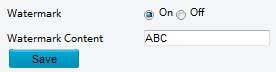
2. Select On to enable watermark, and then input watermark content.
3. Click Save.
Note: please download EZPlayer to verify the video’s continues.
TAGS:
Privacy protection, security, watermark, encrypt video content


Hotline(English):
800-860-7999(USA) | 800-914-6008 (Canada)
+86 571 85309090 (Other Regions)
Email/Skype: service@uniview.com